The Native Desktop GUI for oh-my-pi
Break free from terminal constraints. PiDesk gives omp (oh-my-pi) a distraction-free,
~8MB native desktop interface with multi-tab sessions, interactive code review, visual plan mode, and global spotlight quick bar.
Everything You Need For AI-Assisted Coding
Designed from the ground up for high-leverage workflows with oh-my-pi and frontier reasoning models.
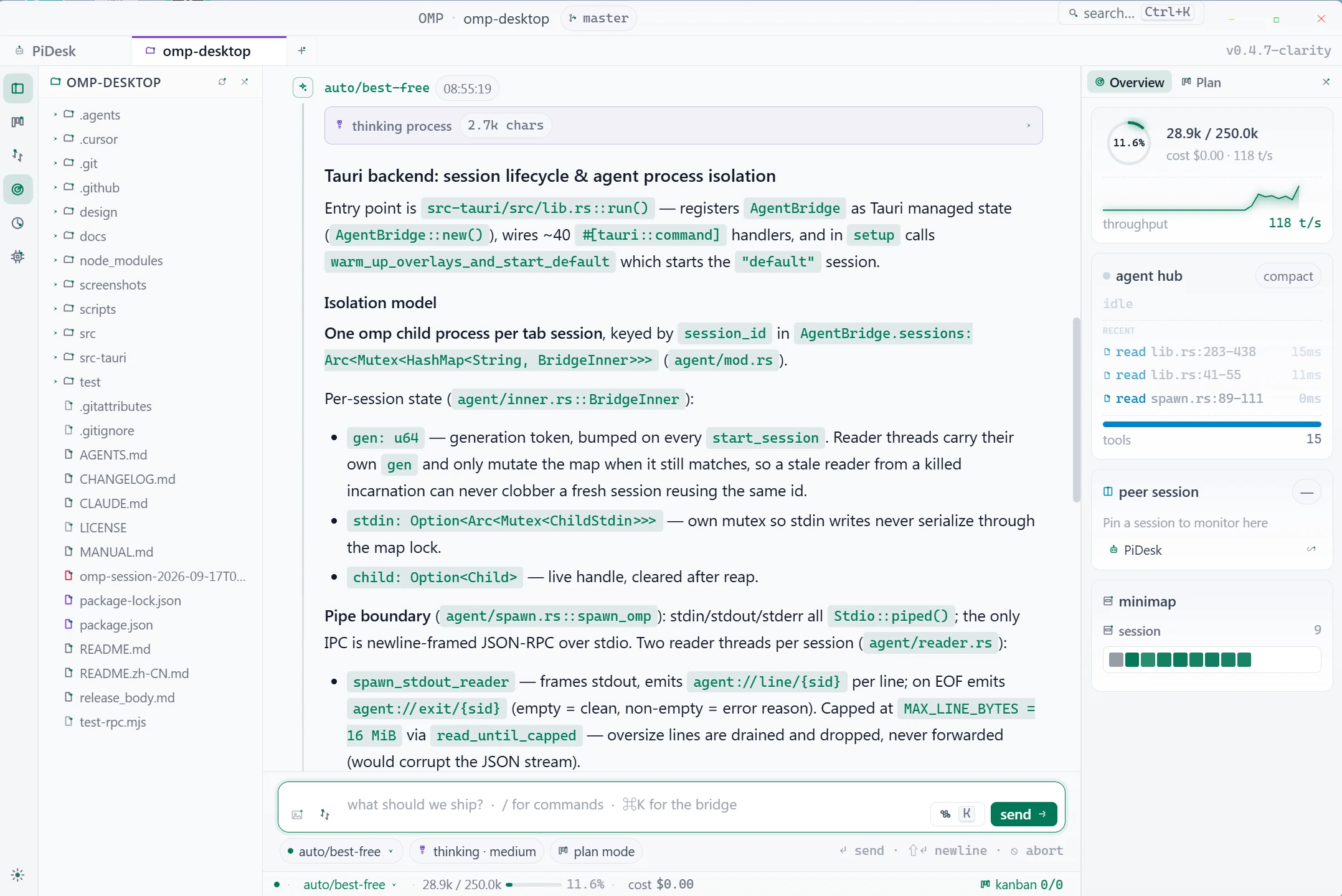
Multi-Panel Distraction-Free Workspace
IDE-Grade ArchitectureIsolated multi-tab sessions where each tab runs an independent omp --mode rpc child process with full state and stream persistence.
- ✦ 44px Activity Bar with shortcuts (Files, Plan, Review, Models)
- ✦ Interactive File Explorer with live file-watcher sync
- ✦ Dockable Right Panel: Token minimap, peer sessions & plan
- ✦ Quick Repo Switcher tracking your 10 most recent projects
Why Native Matters
PiDesk is engineered with Tauri 2 and Rust to deliver blazing native responsiveness while respecting your machine's system resources.
| Architecture Metric | PiDesk (Tauri 2 + Rust) | Typical Electron Wrappers |
|---|---|---|
| Binary / Installer Size | ✓ ~4–5 MB installer (~8 MB installed) | 150 MB – 300 MB+ |
| Base Idle Memory (RAM) | ✓ ~30 MB – 50 MB | 300 MB – 500 MB+ |
| Cold Startup Time | ✓ Sub-second (< 200 ms) | 2 – 4 seconds |
| Agent Communication | ✓ Direct local omp --mode rpc child process | Heavy Chromium IPC pipelines |
| Privacy & Network Footprint | ✓ 100% offline-ready, strict CSP, 0 CDN bloat | Bundled browser chrome & telemetry |
| Native System Tray & Overlay | ✓ Lightweight native Rust OS bindings | Separate hidden browser windows |
Option A: Homebrew Cask (Recommended)
Option B: Manual DMG Download
Download the .dmg package (aarch64 for Apple Silicon or x64 for Intel). If macOS Gatekeeper flags the unsigned binary, clear quarantine once in terminal:
Download the official .msi installer (recommended) or .exe setup from GitHub Releases.
omp.exe is available in your user PATH (typically %LOCALAPPDATA%\omp\omp.exe).
Download .AppImage (standalone), .deb (Ubuntu/Debian), or .rpm (Fedora/RHEL).
Requires Rust (stable 1.77+), Node.js (18+), and Tauri CLI 2.x.
Got Questions? We’ve Got Answers.
Everything you need to know about PiDesk, compatibility, and architecture.
PiDesk is engineered specifically for oh-my-pi (omp). While oh-my-pi is built upon the Pi Agent architecture, PiDesk communicates directly with omp --mode rpc child processes and is not tested on or directly designed for standalone Pi Agent. It provides multi-tab sessions, an interactive code review drawer, a visual Kanban board, and global hotkeys without needing a terminal or web browser.
Yes. PiDesk interacts with your locally installed omp binary. Make sure omp is installed and accessible on your system PATH (version 14.8+ recommended). On Windows, it is typically located in your user profile or local app data.
PiDesk supports two model tiers: OAuth-authenticated providers via omp login (Cursor, Anthropic, OpenAI Codex, GitHub Copilot) whose models sync automatically, and custom endpoints via the visual Model Manager (DeepSeek, OpenRouter, SiliconFlow, Ollama, vLLM, LM Studio) using OpenAI-, Anthropic-, or Gemini-compatible APIs.
The .AppImage is a universal, self-contained bundle that ships its own runtime libraries so it works on any distribution. The .deb and .rpm packages (about 6 MB) rely on your system's WebKitGTK instead, which keeps them as small as the macOS and Windows installers.
No. PiDesk has no telemetry, no tracking, and no proprietary backend servers. All IPC happens strictly on localhost between the native Tauri application and your local omp process. Your model requests travel directly from omp to the AI provider endpoint you configured.
PiDesk is open source under the MIT License. Created and maintained by Rick Wang, it is an independent project evolved from apoc/omp-desktop. Contributions, issues, and feature requests are welcome on GitHub.